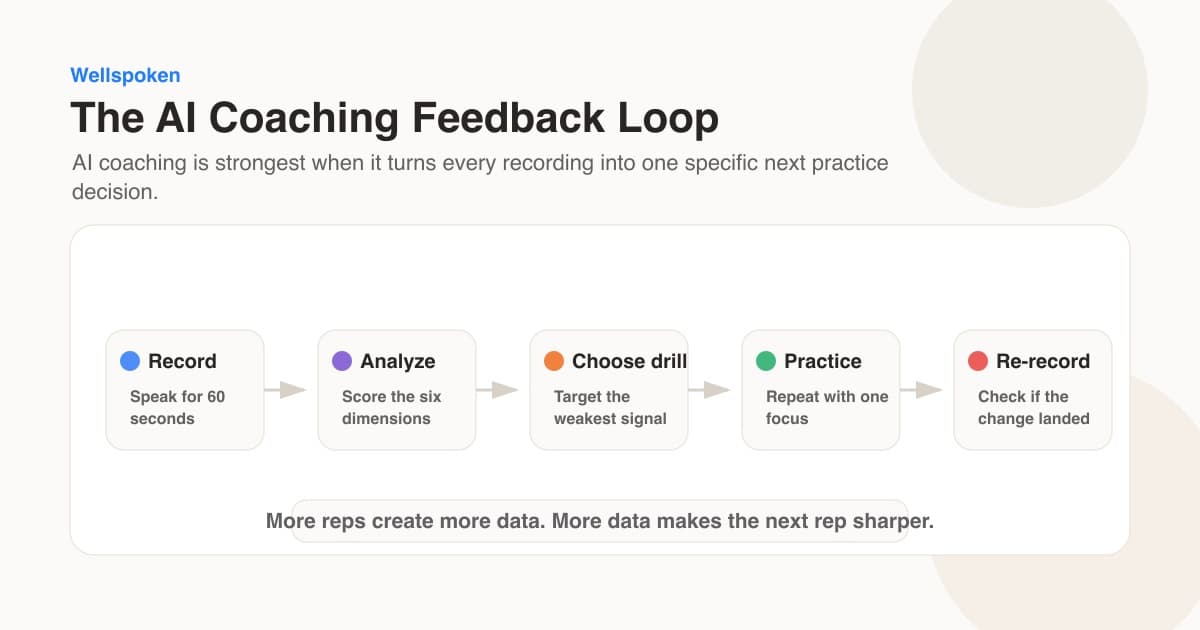
Summary: AI feedback helps your presentation delivery when you record one complete take, pick a single flagged moment, watch the playback around it, and test one specific change on the next take.
An AI report can produce a crowded list: pace, filler words, pitch, repetition, slide reading, and more. Fixing the entire list at once makes the next rehearsal harder to interpret. Use one report observation as a question for your next rehearsal. You decide which observation matters, make one change, and compare the result.
Microsoft describes pace and slide-reading feedback. Cornell describes recorded practice with a rubric. The review below is our coaching adaptation: listen to the flagged moment before choosing a change.
Use the Signal-Then-Shift review
The Signal-Then-Shift review turns a long feedback report into a controlled experiment:
- Record: Deliver a full section without restarting.
- Locate: Find one timestamp connected to an AI flag.
- Interpret: Watch ten seconds before and after that moment.
- Shift: Choose one physical or verbal adjustment.
- Retake: Deliver the same section once more.
For example, imagine the report flags a fast pace during a product launch presentation. Playback shows the rush begins when you reach the pricing slide. Your shift is specific: pause after stating the price, then explain the reason behind it. The second take tests that pause. You are training a behavior connected to a real moment, rather than trying to "sound more confident" everywhere.
Review the reasoning separately from the delivery. For instance, listen once for the recommendation and once for the pause before it. These are different questions even when you use the same recording.
Score the moment before changing it
Use a four-part rubric for the thirty seconds around the flagged moment. Score each line from 0 to 2.
| Dimension | 0 | 1 | 2 |
|---|---|---|---|
| Message | Main point is absent | Main point arrives late | Main point comes first |
| Pace | Words blur together | Mostly clear with one rush | Easy to process throughout |
| Pauses | No useful break | One accidental break | Silence marks the key idea |
| Slide relationship | Reads the slide | Mixes reading and explaining | Adds meaning beyond the slide |
Treat the table as a handwritten checklist. A second take may feel smoother while making the recommendation less clear. Keep the change only when the relevant row improves and the explanation still makes sense. The scale has no pass mark and has not been validated as an assessment.
For a broader view of measurable speaking dimensions, read the Wellspoken Index methodology. Use the method here to compare your own recordings. No app can guarantee presentation improvement, so judge each suggestion against your audience and situation.
Check whether the change survived the next question
After the revised take, answer one follow-up that was not in your notes. For a pricing presentation, try "What would change if we delayed the launch?" Keep the same delivery target, such as pausing after the recommendation. Listen for whether the pause remains useful when the wording changes.
Save a short review note: the original timestamp, the change you tried, what improved and what became harder. If the new pause makes the answer sound fragmented, adjust its position and record again. This is a practical rehearsal comparison. It does not establish that the AI suggestion caused lasting improvement or that a higher report score will persuade a real audience.
Know when the AI flag is incomplete
Automated signals require context. A faster pace can express excitement. A repeated phrase can help an audience remember a theme. Reading an exact sentence can be appropriate for a quotation, legal wording, or safety instruction. Review the actual moment before accepting a recommendation.
Use three questions:
- Did the audience need more processing time here?
- Did this delivery choice support the meaning?
- Can I name the adjustment I will test next?
If the answer to the third question is vague, shrink the target. "Improve vocal variety" is hard to rehearse. "Slow the first sentence after slide four" is testable.
AI is also limited at audience-specific judgment. A rehearsal tool does not know that your finance team already understands the background, or that your client may hear a joke as dismissive. Ask a person who knows the audience to review message fit, sensitive phrasing, and the strength of your recommendation. Cornell suggests pairing recorded self-assessment with peer feedback, which gives you both repeatable observation and human interpretation.
Build a useful feedback sequence
Run three different rehearsals instead of repeating the same take:
| Rehearsal | Focus | Feedback source |
|---|---|---|
| Diagnostic | Find the weakest observable moment | AI report plus playback |
| Repair | Test one delivery change | Same rubric and same section |
| Audience | Check message, tone, and likely questions | Trusted colleague or coach |
This sequence keeps the technology in the right role. It measures patterns quickly, while you retain responsibility for meaning. If fillers are the clearest issue, use the filler-word audit. If the report points to pacing, compare the recording with a practical speaking-rate guide.
Your next rehearsal needs only one target. Open Wellspoken, record the section that matters most, review the delivery breakdown, and apply the Signal-Then-Shift review to one timestamp.
Key Takeaway
Use an AI report to locate one observable moment, then test a change against the recording and your listener's needs. Record a full section, apply the Signal-Then-Shift review to a single timestamp, and compare the two takes with the same rubric.
Review the video-call conditions separately
Keep a note of whether the sample contains only your voice, whether another speaker overlaps and which microphone the platform used. A recording from the meeting service may differ from a local file. That difference matters when you compare a pace or pause result.
Choose one AI comment you can inspect. If the report says you rushed a recommendation, find the moment, check the transcript and listen without watching the score. Try the sentence again with a clear idea boundary, then ask a listener what action they heard. Keep the comment only if it helps you make a useful change.
Leave camera framing and screen-sharing controls in their own review. Audio analysis cannot establish whether a chart was readable or a participant could access captions. Avoid feeding identifiable meeting material into a new service without the appropriate permission and policy checks. A practice recording with invented work details can test the delivery without exposing the original conversation.